


Download Norton Ghost – backup, data recovery, system protection, file backup, disk imaging, secure backup, recovery tool, data safety, system restore, backup software
Overview
Norton Ghost, developed by Symantec, is a specialized utility designed to provide robust system protection and data recovery capabilities. As a long-standing solution in the field of digital backup and recovery, it addresses the critical need for safeguarding important files, applications, and entire disk environments against system crashes, hardware failures, or data corruption. The application is particularly valuable for users who rely on consistent access to their digital assets and require a reliable method to restore their systems to a previous stable state.
Target users include individuals managing personal workspaces, small business owners, and IT professionals seeking a dependable tool for system imaging and recovery. Its core function—creating full disk images and selective file backups—makes it suitable for scenarios such as pre-upgrade system snapshots, disaster recovery, and migration between devices. By preserving complete system states, Norton Ghost ensures minimal downtime in the event of failure.
Although the developer did not provide additional technical details about Symantec’s broader product strategy, the application’s inclusion in the utilities category and its focus on disk imaging underscore its role as a foundational tool in data protection ecosystems. Its ability to generate encrypted and verified backups further strengthens its position as a trusted solution for users prioritizing data integrity and security.
Key Features & Functionality
- Advanced Protection and Backup Methods – Norton Ghost employs sophisticated algorithms to create secure backups of entire systems, applications, and critical folders. This ensures that every component of the user’s digital environment is preserved with high fidelity, minimizing the risk of data loss during system failures.
- Customizable Backup Options – Users can tailor their backup strategy by selecting full disk imaging, selective folder backups (e.g., “My Documents”), or targeted application data. This flexibility allows for efficient storage usage and faster recovery times based on individual needs.
- Encrypted and Verified Backups – All backups are automatically encrypted during creation and verified for integrity. This dual-layer security ensures that sensitive data remains protected from unauthorized access and that recovery files are accurate and usable when needed.
- External Copy and Remote Management – The tool supports copying backups to external drives and enables remote access for management, enhancing usability in multi-device or distributed environments. This feature is especially beneficial for advanced users managing multiple systems.
- Comprehensive System Restore Capabilities – In the event of a system crash or corruption, Norton Ghost enables full system restoration from a previously created image, returning the machine to its exact prior state without requiring reinstallation of software or reconfiguration.
For example, a user preparing to upgrade their operating system can create a full disk image before installation. If the update causes instability, they can restore the system in minutes using the saved image. Similarly, a small business owner can schedule periodic backups of critical project folders, ensuring data safety even in the face of accidental deletion or malware attacks.
Interface, UX & Performance
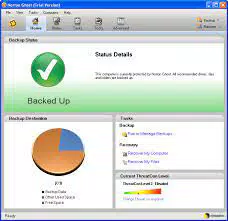
The user interface of Norton Ghost is designed with functionality in mind, offering a structured layout that guides users through the backup and recovery process. Navigation is straightforward, with clearly labeled menus for initiating backups, managing existing images, and restoring system states. The visual style aligns with traditional desktop utility applications, prioritizing clarity over aesthetic flair.
Although the developer did not list formal performance metrics, the application appears optimized for stability during long-running backup tasks. Users can expect consistent performance across different device categories, including standard desktops and higher-end workstations. Responsiveness remains high during active operations, with minimal lag during file selection and image creation.
System resource usage is managed efficiently, allowing users to continue working during backup processes without significant performance degradation. The application maintains stability even when handling large disk images, reducing the risk of interruptions. However, specific requirements for memory, CPU, or disk space were not disclosed, so users should ensure adequate system capacity before initiating full disk backups.
Platform Compatibility & Technical Requirements
Norton Ghost is available exclusively for the Windows platform. It is compatible with Windows operating systems, though the exact version requirements were not specified by the developer. The application has a file size of 400MB, which is typical for a full-featured backup utility with imaging capabilities.
Given its size and functionality, users should ensure their system has sufficient storage space to accommodate both the application and the backup images it generates. The software version is 10.0, indicating a mature release with established features. The release date of April 15, 2023, suggests it is a recent update, potentially incorporating improvements in security and compatibility.
The developer did not specify minimum OS requirements or hardware prerequisites. Therefore, users should consult official documentation or compatibility tools before installation to ensure seamless operation.
Pros and Cons
Pros
- Comprehensive backup and recovery capabilities for full systems and individual files
- Supports encrypted and verified backups for enhanced data security
- Flexible backup options including full disk imaging and selective folder backups
- Remote management and external storage support for improved accessibility
- Proven track record as a reliable system protection tool from a trusted developer
Cons
- Price point of $49.99 may be considered high for casual users
- Compatibility information was not fully disclosed
- Limited to Windows platform, excluding macOS and Linux users
- No publicly available details on automatic update frequency
- Interface may feel outdated compared to modern, minimalist design trends
FAQ
Is Norton Ghost safe to install and use?
Yes, Norton Ghost is developed by Symantec, a well-established cybersecurity company. The application is designed with security in mind, including encryption for backups and verified integrity checks.
Can I use Norton Ghost to restore my system after a crash?
Yes, one of the primary functions of Norton Ghost is system restoration. It allows users to recover their entire system from a previously created disk image, minimizing downtime after failures.
Is Norton Ghost available for mobile devices?
Based on the available information, Norton Ghost is designed for Windows desktop and laptop systems. There is no indication of a mobile version for Android or iOS.
How often should I create a backup with Norton Ghost?
Backup frequency depends on user needs. It is recommended to create a full backup before major system changes, such as OS updates or software installations, and to schedule regular backups for critical data.
Does Norton Ghost support automatic updates?
The developer did not provide details on automatic update functionality. Users should check the application settings or official website for update policies.
Final Thoughts
Norton Ghost stands out as a powerful and dependable solution for users who demand complete control over their system’s integrity and data safety. Its ability to create secure, encrypted, and verified backups makes it an essential tool for individuals and organizations alike. While the price may be a barrier for some, the depth of functionality and reliability justify the investment for those prioritizing long-term data protection.
Whether you're preparing for a system upgrade, recovering from a crash, or simply safeguarding valuable files, Norton Ghost delivers a robust, professional-grade experience. For anyone serious about digital resilience, this application offers peace of mind through comprehensive system imaging and recovery.
Download Norton Ghost now


